Your CRM is only as good as the data inside it. Every invalid email address that slips into your contact database triggers a chain of problems: bounced campaigns, damaged sender reputation, inflated contact counts, and wasted sales outreach. Most teams treat email validation as a periodic cleanup task, running a bulk verification pass once a quarter and calling it done. That approach is like mopping the floor while the faucet is still running.
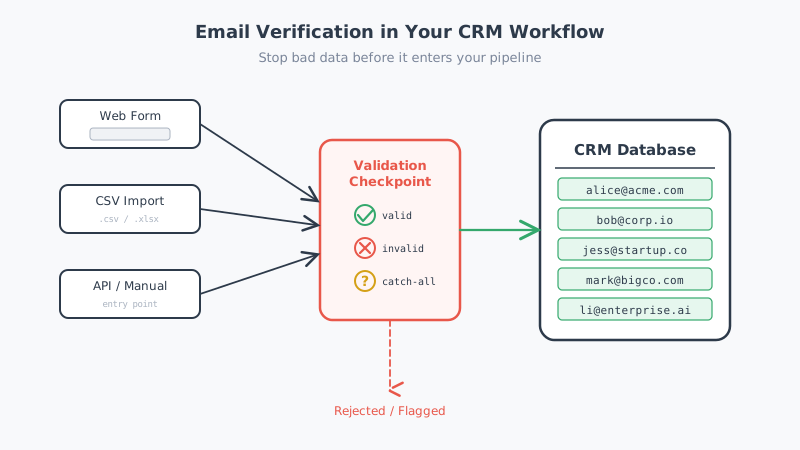
The smarter play is to stop bad data at the point of entry. By integrating email verification directly into your CRM workflow, you catch invalid, disposable, and risky addresses before they ever become records in your database. This post walks through exactly how to do that across the most common CRM entry points.
Why Reactive Cleanup Is Not Enough
Most organizations discover bad email data after the damage is done. A marketing campaign bounces at 8%, triggering a reputation downgrade at Gmail. A sales rep wastes two weeks following up on leads that never had valid contact information. A “qualified” pipeline of 5,000 contacts turns out to contain 1,200 addresses that were dead on arrival.
Quarterly or monthly list cleaning addresses symptoms, not causes. Between cleaning cycles, bad data accumulates in your CRM, gets synced to your email platform, triggers automated sequences, and generates bounces. Each bounce chips away at your sender reputation. By the time you clean the list, the reputational damage has already compounded.
Proactive verification at the point of entry eliminates this cycle entirely. Every address is validated before it becomes a CRM record, which means your database stays clean continuously rather than oscillating between dirty and recently cleaned states.
The Three Entry Points Where Bad Data Gets In
Bad email data enters your CRM through three primary channels. Each requires a different verification integration approach.
1. Web Forms and Landing Pages
Web forms are the highest-volume source of bad email data for most B2B companies. Prospects mistype their addresses, use disposable email services to grab gated content, or enter fake addresses to avoid follow-up. Bots submit forms with randomly generated strings. Even well-intentioned visitors make typos that turn valid addresses into permanent bounces.
How to integrate verification here:
Add real-time email validation to your form submission flow. When a visitor enters their email address and tabs to the next field (or clicks submit), an API call validates the address before the form submission completes. If the address is invalid, the form displays an inline error asking the visitor to correct it.
Most email validation APIs respond in under 500 milliseconds, so the user experience impact is negligible. The implementation typically looks like this:
- Attach a blur event or form submit handler to the email input field
- Call the verification API with the entered address
- If the API returns “invalid” or “undeliverable,” display a message like “This email address appears to be invalid. Please check for typos.”
- If the API returns “risky” or “unknown,” you can either accept with a warning or require correction depending on your lead quality standards
- Only submit the form to your CRM when the address passes validation
For HubSpot users, this can be implemented through custom form validation using the HubSpot Forms API, or by using a webhook-based workflow that validates the email immediately after form submission and updates the contact property accordingly. Salesforce users can achieve similar results through a before-insert Apex trigger on the Lead or Contact object, or through a Flow that fires on record creation.
2. CSV and Bulk List Imports
Sales and marketing teams regularly import contact lists from events, purchased databases, partner referrals, and lead generation campaigns. These imports are notorious for poor data quality. Event badge scans capture mistyped addresses. Purchased lists contain outdated or fabricated contacts. Partner referral lists have not been cleaned since they were compiled.
How to integrate verification here:
Build a mandatory validation step into your import workflow. Before any CSV touches your CRM, the entire list passes through bulk email verification. This can be implemented in several ways:
- Pre-import validation tool: Run the list through a bulk verification service before importing. Remove or flag invalid addresses, then import only the clean subset.
- CRM-native automation: Configure a workflow that triggers on bulk record creation (most CRMs can detect bulk operations) and routes new records through an email validation API before marking them as active.
- Integration middleware: Tools like Zapier, Make, or native CRM integrations can sit between your import process and CRM, validating each record in transit.
The key principle is that no imported record should enter your active contact database without passing email validation first. This is especially critical for teams running outbound campaigns with tools like Kali, where sending calendar-based outreach to invalid addresses wastes credits and harms deliverability.
3. Manual Entry and API-Created Records
Sales reps manually enter contacts from business cards, LinkedIn conversations, and phone calls. Integration partners create records through your CRM’s API. These entry points are lower volume but often carry the worst data quality because there is no form validation or automated checking in place.
How to integrate verification here:
For manual entry, implement a validation rule or trigger that fires whenever a new contact or lead record is created (or when the email field is updated). In Salesforce, this is a before-insert/before-update trigger. In HubSpot, it is a workflow triggered by contact creation or email property change.
For API-created records, add email validation as a step in your integration pipeline. Before the API call creates the CRM record, validate the email address. If it fails, either reject the record or create it with a “needs verification” status that prevents it from entering any outreach sequences.
Handling Catch-All Domains: The Problem Standard Validators Miss
Here is where most email verification integrations fall short. Standard email validators perform an SMTP handshake with the recipient’s mail server to check if a specific address exists. This works reliably for most email providers. But roughly 20 to 30% of B2B email domains are configured as catch-all (also called accept-all) servers.
A catch-all domain accepts email sent to any address at that domain, regardless of whether the specific mailbox exists. When a standard validator checks “fakeperson@catchall-company.com,” the server responds with a positive signal. The validator marks the address as valid. But the mailbox might not exist; the email either bounces internally, gets routed to a catch-all inbox that nobody monitors, or simply disappears.
For B2B sales and marketing teams, catch-all domains are everywhere. Many mid-size and enterprise companies run catch-all configurations on their mail servers. This means a significant percentage of your CRM contacts sit on catch-all domains, and standard validation cannot tell you which of those contacts have real, active mailboxes.
This is the specific problem that Scrubby was built to solve. Scrubby goes beyond standard SMTP checks to verify whether individual mailboxes on catch-all domains are actually deliverable. Instead of marking every catch-all address as “unknown” or “accept-all” (which is what most validators do), Scrubby provides a definitive deliverable or undeliverable result for these addresses. For teams whose CRM is full of B2B contacts, this distinction prevents thousands of wasted sends and protects sender reputation against the slow decay that catch-all domains cause.
Why Catch-All Verification Matters for CRM Workflows
When you integrate standard email verification into your CRM, catch-all addresses create a gray area. They are not flagged as invalid, so they pass your validation gate and enter your database as apparently clean contacts. But when you email them, a portion will silently fail. No bounce, no open, no engagement. Just dead weight pulling down your deliverability metrics.
Over time, these phantom contacts accumulate. Your CRM shows 50,000 “verified” contacts, but 8,000 of them are catch-all addresses where the actual mailbox no longer exists. Your email campaigns show declining open rates not because your content is getting worse, but because a growing percentage of your “delivered” emails are landing in catch-all voids.
By integrating catch-all verification through Scrubby into your CRM entry points, you close this gap. Catch-all addresses get verified to the same standard as all other addresses, and only genuinely deliverable contacts enter your active database.
Implementation Patterns by CRM
HubSpot
HubSpot offers several integration points for email verification:
- Form validation: Use the HubSpot Forms API with custom validation, or implement client-side validation on embedded forms that calls a verification API before submission.
- Workflow-based validation: Create a workflow triggered by “Contact is created” or “Contact email is known.” The workflow calls a verification API through a webhook action, then sets a custom property like “Email Verification Status” based on the response.
- Operations Hub: If you have Operations Hub Professional or Enterprise, use custom-coded workflow actions to call a verification API and process the response directly within HubSpot.
- Import validation: Use the workflow trigger “Contact imported” to route imported records through verification before they enter active lists or sequences.
A practical pattern is to create a “Verification Pending” lifecycle stage or list. All new contacts enter this holding area. The verification workflow processes them and moves verified contacts to the appropriate stage while flagging or removing invalid ones.
Salesforce
Salesforce provides deeper customization options:
- Apex triggers: Write a before-insert and before-update trigger on the Lead and Contact objects that calls a verification API through an HTTP callout. This validates every address at the moment of creation or modification.
- Flow Builder: Create a record-triggered flow that fires on Lead or Contact creation. Use an HTTP callout action to verify the email, then update a custom “Email Status” field.
- Platform Events: For high-volume environments, publish a platform event when a new record is created, then process verification asynchronously through a subscriber that updates the record status.
- AppExchange integrations: Several email verification providers offer native Salesforce packages that handle the integration without custom development.
For Salesforce environments, the Apex trigger approach is the most reliable because it executes synchronously before the record is saved, preventing invalid data from ever entering the database.
Other CRMs (Pipedrive, Zoho, ActiveCampaign, etc.)
For CRMs without native code execution, the integration typically happens through middleware:
- Zapier/Make workflows: Trigger on new contact creation, validate the email through a verification API step, then update the contact record with the verification result (or delete the record if invalid).
- Native API integrations: Many verification services provide direct integrations with popular CRMs through their marketplace or app stores.
- Webhook-based validation: Configure the CRM to send a webhook on record creation, process the verification externally, and update the record through the CRM’s API.
Building Your Verification Strategy: Practical Guidelines
What to validate and when
Not every verification check needs to happen in real time. Here is a practical framework:
- Real-time (synchronous) validation: Apply to web forms and manual entry. The user is present and can correct errors immediately.
- Near-real-time (asynchronous) validation: Apply to API-created records and automated imports. Validate within minutes of creation and flag or quarantine records that fail.
- Batch validation: Apply to existing database records on a recurring schedule (monthly or quarterly) to catch addresses that have gone stale since initial verification.
What to do with failed verifications
Define clear rules for each verification result:
- Valid/deliverable: Accept the record with no restrictions.
- Invalid/undeliverable: Block the record from entering CRM, or create it in a quarantine status. Never add it to active email lists.
- Catch-all (unverified by standard tools): Route to catch-all-specific verification through a tool like Scrubby. Hold in a pending state until verified.
- Disposable/temporary: Block entirely. These addresses indicate low-intent signups.
- Role-based (info@, support@): Accept into CRM for company-level records, but exclude from personalized outreach sequences.
Measuring the impact
Track these metrics before and after implementing CRM-integrated verification:
- Bounce rate per campaign: Should drop below 2% and stay there.
- New contact invalid rate: The percentage of newly created contacts that fail verification. Aim for under 1% on web form submissions after implementing real-time validation.
- CRM contact accuracy: Run periodic audits comparing CRM email counts against verification results. Your verified-valid rate should exceed 95%.
- Sender reputation scores: Monitor through Google Postmaster Tools and Microsoft SNDS. Expect steady improvement after eliminating bounce sources.
Bringing It All Together
Integrating email verification into your CRM workflow is not a single project; it is a design principle. Every entry point, whether a web form, a CSV import, a manual entry, or an API call, should have a validation gate that prevents bad data from entering your system.
The investment pays for itself quickly. Fewer bounces mean better sender reputation. Better sender reputation means higher inbox placement. Higher inbox placement means better engagement rates across every campaign you send. And when your go-to-market team is coordinating across multiple channels, such as combining email outreach with the kind of systematic competitor intelligence that CAM provides, clean CRM data becomes the foundation that makes every other tool more effective.
Start with the highest-volume entry point (usually web forms), implement real-time validation there, and expand to other entry points over the following weeks. Add catch-all verification to handle the B2B addresses that standard validators miss. Within a month, your CRM will contain meaningfully cleaner data, and every downstream system that depends on that data will perform better as a result.
The choice is straightforward: validate at the door, or clean up the mess later. One of those approaches scales. The other just gets more expensive over time.

Scrubby Team
Admin