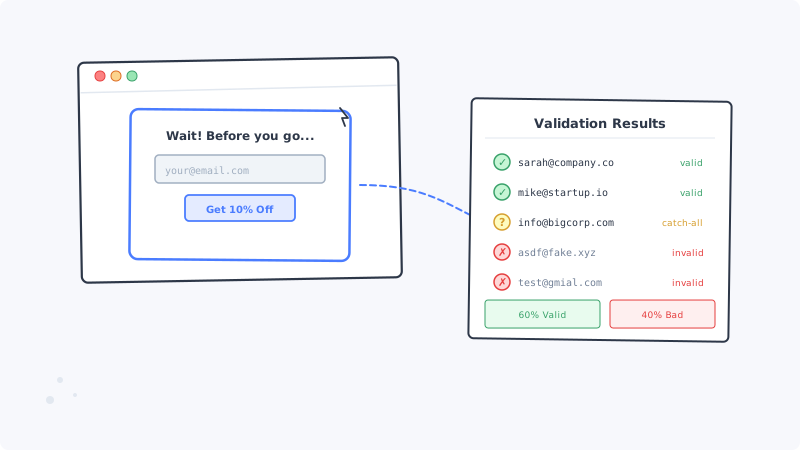
You run an e-commerce store. Your exit-intent popup offers 10 percent off in exchange for an email address. It fires when the visitor moves their cursor toward the browser’s close button. The popup converts at 4 percent, which looks great in your analytics dashboard.
But here is what the dashboard does not show you: 30 to 40 percent of those email addresses are garbage. Typos, disposable inboxes, completely fabricated strings. Every one of them enters your email platform, inflates your list count, and silently degrades your deliverability the moment you hit send.
Exit-intent popups are one of the highest-converting lead capture tools available. They are also one of the most dangerous for email list quality. Understanding why, and what to do about it, is the difference between a popup that grows revenue and one that slowly destroys your sender reputation.
Why Exit-Intent Emails Are Uniquely Low Quality
The psychology of exit-intent popups creates a perfect storm for bad data.
The visitor is already leaving. They have made the decision to close the tab. The popup interrupts that decision with a value proposition (usually a discount). The visitor’s goal is not to join your email list. Their goal is to either dismiss the popup and leave, or grab the discount with minimal effort. That minimal effort often means typing the fastest string that looks like an email address.
There is no account creation friction. When someone registers for an account on your site, they typically need to confirm their email or log in with it later. That creates a natural incentive to provide a real address. Exit-intent popups have zero downstream accountability. The visitor types an address, clicks submit, and receives the coupon code immediately. They never need that email address to work.
Disposable email usage is high. Savvy visitors know that submitting an email means marketing messages. Many use disposable email services (Guerrilla Mail, Temp Mail, 10MinuteMail) specifically for these interactions. The address works for the 30 seconds needed to receive the coupon code, then it self-destructs. Your welcome sequence hits a dead inbox.
Typos are more frequent under time pressure. The popup creates urgency. Visitors type quickly on mobile keyboards or while their cursor is already in motion toward the close button. Common typos like “gmial.com” instead of “gmail.com” or “yaho.com” instead of “yahoo.com” occur at significantly higher rates than in standard form submissions where the user is more deliberate.
The Compound Damage of Unvalidated Popup Emails
The problem is not just a few bounced emails. Unvalidated popup addresses create cascading failures across your entire email marketing operation.
Your bounce rate climbs above safe thresholds. Email service providers (ESPs) like Mailchimp, Klaviyo, and Brevo flag accounts when bounce rates exceed 2 percent. If you are adding hundreds of unvalidated popup emails per week and sending your welcome sequence to all of them, you can hit that threshold within a single campaign. Once flagged, your account may face sending restrictions or suspension.
Spam traps enter your list. Some of the fake or mistyped addresses that popup visitors submit happen to be recycled spam traps. These are old, abandoned email addresses that inbox providers have repurposed specifically to catch senders with poor list hygiene. Hitting a spam trap does not just hurt your open rate. It can get your sending domain blocklisted across major providers.
Your segmentation data becomes unreliable. Marketing teams use signup source as a segmentation criterion. If your “exit-intent popup” segment is 35 percent invalid addresses, any A/B test, engagement analysis, or cohort comparison involving that segment is built on contaminated data. You cannot optimize what you cannot accurately measure.
You overpay for your email platform. Most email platforms charge based on subscriber count. Every fake address in your list is a line item on your monthly bill. For a high-traffic e-commerce site adding 2,000 popup signups per month with 35 percent invalid, that is 700 phantom subscribers per month, or 8,400 per year, inflating your platform tier for contacts that will never open an email.
Real-Time Validation at the Point of Capture
The most effective defense is validating the email address before it enters your system. Real-time validation checks the address at the moment the visitor submits the popup form, before the coupon code is delivered.
How Real-Time Validation Works
When the visitor submits the popup form, the email address is sent to a validation API before the form submission completes. The API performs several checks in under a second:
Syntax validation catches obvious formatting errors. Addresses missing the @ symbol, containing spaces, or using invalid characters are rejected immediately.
Domain verification confirms that the domain exists and has valid MX records. An address like “user@fakestorenotreal.com” fails because the domain has no mail server.
Mailbox verification pings the mail server to determine whether the specific mailbox exists. This catches addresses with valid domains but nonexistent usernames, like “asdfasdf@gmail.com.”
Disposable email detection identifies addresses from known temporary email providers. If the domain belongs to a disposable email service, the address is flagged before it pollutes your list.
Typo suggestion detects common domain misspellings and can prompt the visitor to correct them. “Did you mean gmail.com?” saves a real lead from being lost to a typo.
Implementation Without Killing Conversion Rates
The biggest concern with real-time validation on popups is conversion friction. If your popup rejects an email and shows a red error message, you might lose visitors who mistyped their address and do not bother to correct it.
Here is how to balance data quality with conversion:
Show helpful correction prompts instead of hard rejections. Instead of “Invalid email address,” display “Did you mean sarah@gmail.com?” with a one-click correction. This recovers real leads while filtering out intentionally fake ones.
Allow soft-fail for catch-all domains. Some corporate email servers accept all incoming mail regardless of whether the specific mailbox exists. These “catch-all” addresses cannot be verified in real time. Accept them at the popup stage, but flag them for secondary validation through a service like Scrubby that specializes in resolving catch-all deliverability.
Validate asynchronously for mobile users. On mobile, popup interactions happen fast. Run the validation check after form submission but before adding the address to your marketing list. Deliver the coupon code immediately (via the popup itself or an on-page message) so the user experience is unaffected, and only add the address to your email sequence once validation confirms it is real.
Block only the most obvious junk. In the real-time validation step, reject addresses that fail syntax checks, have invalid domains, or come from disposable providers. Let everything else through to the secondary validation layer. This keeps your popup conversion rate high while still catching the worst offenders.
Batch Validation for Existing Popup Lists
If you have been running exit-intent popups without validation, your existing list needs cleaning. Batch validation processes your entire subscriber list and categorizes each address.
The Process
Export your popup segment. Pull every subscriber whose signup source is your exit-intent popup. If your email platform does not track signup source, export your full list and plan to validate all of it.
Run standard verification. This identifies addresses that are definitively invalid (bad syntax, dead domains, nonexistent mailboxes). For an unvalidated popup list that is more than three months old, expect 15 to 25 percent to come back as hard invalid.
Resolve catch-all addresses. After standard verification, you will have a segment of addresses on catch-all domains where the mail server accepts everything. Standard tools cannot tell you whether the specific mailbox is real. Scrubby uses behavioral deliverability testing to determine which catch-all addresses will actually receive and engage with your emails versus which are phantom endpoints. For e-commerce lists with significant B2B crossover (corporate buyers, procurement teams), catch-all resolution can reclassify 20 to 30 percent of your “unknown” segment as non-deliverable.
Suppress and segment. Remove all hard invalids immediately. Move non-deliverable catch-all results to a suppression list. For the remaining verified addresses, segment by engagement history and run a reactivation sequence before resuming full campaign sends.
Integrating Validation With Your E-Commerce Stack
The specifics depend on your platform, but the pattern is consistent.
Shopify with Klaviyo or Mailchimp: Most Shopify popup apps (Privy, Justuno, OptinMonster) support webhook integrations. Route the submitted email through a validation API before it syncs to your ESP. If your popup app does not support webhooks, use Zapier or Make to add a validation step between the popup submission trigger and the “add to email list” action.
WooCommerce with custom popups: If you are using a WordPress popup plugin, add a server-side validation call in the form handler. Validate before writing the subscriber to your database or syncing to your ESP.
Headless or custom storefronts: You have full control. Add the validation API call to your popup form handler on the backend. Never validate on the client side only, because JavaScript validation can be bypassed.
If your outbound sales team also uses email for cold outreach to leads sourced from your site, ensure those lists are validated separately. Tools like Kali can help your sales team book meetings through calendar-based outreach, but only if the contact data feeding those campaigns is clean.
Measuring the Impact of Popup Email Validation
After implementing validation, track these metrics to quantify the improvement.
Bounce rate before and after. This is the most immediate indicator. If your welcome sequence bounce rate drops from 8 percent to under 1 percent, validation is working. Track this weekly for the first month.
Popup conversion rate. Monitor whether real-time validation reduces your popup conversion rate. A small drop (5 to 10 percent) is expected and healthy because you are filtering out fake submissions. If the drop exceeds 15 percent, soften your validation rules (move from hard rejection to correction prompts).
Email platform costs. Calculate how many invalid subscribers were removed and what that means for your billing tier. For a 50,000-subscriber list where validation removes 8,000 invalid addresses, the savings on platform fees alone can be $50 to $150 per month depending on your provider.
Revenue per email sent. This is the metric that matters most. With invalid addresses removed, your emails reach more real inboxes. Open rates increase because the denominator (total sends) decreases while the numerator (actual opens) stays the same or grows. Click-through and conversion rates follow. Track revenue per email sent for your automated sequences (welcome, abandoned cart, post-purchase) before and after list cleaning.
Keeping an eye on how competitors handle their own lead capture can also inform your popup strategy. Monitoring tools like CAM let you track competitor website changes, including their popup offers and lead magnets, so you can benchmark your approach against what is working in your market.
The Ongoing Discipline
Popup email validation is not a one-time cleanup project. It is a permanent layer in your lead capture infrastructure.
Validate every new popup submission in real time. This prevents bad data from entering your system going forward.
Run batch validation monthly on your full active list. Addresses go stale. People abandon inboxes, companies shut down domains, ISPs recycle addresses. Monthly validation catches the natural decay.
Review your popup design quarterly. If your popup is attracting a high percentage of fake emails (above 30 percent invalid rate on new submissions even with validation), the popup itself may need redesigning. Consider requiring a double opt-in, adding a CAPTCHA for suspected bot traffic, or adjusting the offer to attract higher-intent visitors.
Audit your suppression lists. Addresses you suppress today may become deliverable again if the person creates a new mailbox at the same address or if a catch-all domain changes its configuration. Re-validate suppressed addresses every six months to recapture any that have become deliverable.
Your exit-intent popup is too valuable a conversion tool to let bad data undermine it. Validate at the point of capture, clean what is already in your list, and maintain the discipline going forward. The emails you send will reach real people, your sender reputation will stay intact, and the revenue from your email program will reflect actual customer engagement rather than inflated vanity metrics.

Scrubby Team
Admin