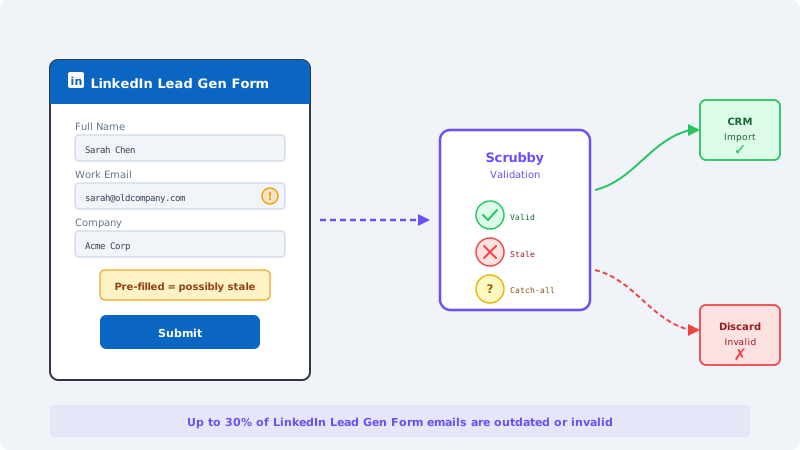
LinkedIn Lead Gen Forms are one of the most popular tools in B2B advertising. You run a Sponsored Content campaign, a user taps the CTA, LinkedIn pre-fills their name, job title, company, and email address from their profile, and they submit the form without typing a single character.
That frictionless experience is exactly why marketers love Lead Gen Forms. It is also exactly why the email addresses they collect are unreliable.
The Pre-Fill Problem Nobody Talks About
When a user creates their LinkedIn profile, they register with whatever email address makes sense at the time. For many professionals, that is their work email. But LinkedIn does not update that email address when someone changes jobs, gets a new corporate domain after an acquisition, or simply switches to a different inbox.
The email address stored in a LinkedIn profile might be one, three, or five years old. When Lead Gen Forms auto-fill that address into your form submission, you receive a contact record that looks perfectly clean but points to a mailbox that no longer exists.
This is fundamentally different from the problems you encounter with manual form fills. When someone types their email into a landing page, the address might contain a typo. When LinkedIn pre-fills an address, it is formatted correctly, attached to a real person, and completely obsolete.
The result: bounce rates on LinkedIn Lead Gen Form imports routinely land between 15 and 30 percent, depending on the audience segment. Enterprise audiences with longer job tenures bounce less. Startup and mid-market segments with higher turnover bounce more.
Why Standard CRM Deduplication Does Not Catch This
Most CRM systems check for duplicate records on import. They compare the incoming email against existing contacts and merge or skip matches. What they do not do is verify whether the email address actually works.
If you import 500 leads from a LinkedIn campaign and 120 of those addresses are dead, your CRM creates 120 records for people you can never reach. Those records consume your CRM seat allocation, inflate your contact database costs, and distort every metric from list size to engagement rates.
Worse, the contact records look legitimate. They have full names, job titles, company names, and LinkedIn profile URLs. Nothing in the data suggests the email is bad until you try to send to it.
What Happens When You Email Unvalidated LinkedIn Leads
The damage from emailing invalid LinkedIn leads follows a predictable pattern.
First send: high bounce rate. Your email platform flags the campaign. Depending on the platform, you get a warning notification, a temporary sending restriction, or both. Platforms like Mailchimp, HubSpot, and ActiveCampaign monitor bounce rates at the campaign level and can restrict your account if a single send exceeds their threshold.
Second impact: sender reputation decline. Gmail, Microsoft 365, and Yahoo evaluate your sending domain based on cumulative metrics. A 20 percent bounce rate on one campaign affects your deliverability on the next campaign, even if the next list is perfectly clean. Reputation recovery takes weeks or months.
Third impact: reduced inbox placement across all campaigns. Once your domain reputation drops, emails to your engaged subscribers start landing in spam folders. The leads you imported from LinkedIn damage the emails you send to everyone else on your list.
Long-term impact: blacklisting. If you repeatedly send to lists with high invalid rates, your sending IP or domain can land on email blacklists like Spamhaus or Barracuda. Getting delisted is a manual process that takes significant time and effort.
LinkedIn-Specific Email Issues You Need to Know
LinkedIn Lead Gen Form emails have unique characteristics that make them harder to validate than typical list data.
Corporate Domain Changes After Acquisitions
When Company A acquires Company B, email domains often change. An employee who registered on LinkedIn as jane@companyb.com may now use jane@companya.com, but their LinkedIn profile still shows the old address. The old domain might be completely shut down, redirected, or converted to a catch-all that accepts everything but delivers nothing.
Catch-All Corporate Domains
Many enterprise companies configure their email servers as catch-all, meaning they accept messages sent to any address at their domain. Standard email validators see the server accept the connection and mark the address as valid. But the message might go to a shared inbox that nobody checks, get silently discarded, or bounce internally after acceptance.
Tools like Scrubby specialize in validating these catch-all and accept-all addresses. Instead of just checking whether the server accepts connections, Scrubby determines whether the specific mailbox is actually deliverable — the critical distinction that most validators skip.
Personal Email Fallback
Some LinkedIn users register with personal Gmail, Yahoo, or Outlook addresses instead of corporate email. When these users fill out your Lead Gen Form, you receive a personal email address for a B2B lead. The address might be valid, but it is the wrong channel for business outreach. Sending B2B sales emails to personal addresses has lower response rates and higher spam complaint rates.
Role-Based Addresses
A subset of LinkedIn users register with role-based addresses like info@company.com, sales@company.com, or admin@company.com. These addresses are typically shared inboxes managed by teams, not individuals. Emailing role-based addresses is a known spam trigger and most email platforms discourage it.
How to Validate LinkedIn Lead Gen Form Emails
The validation step should happen between LinkedIn export and CRM import. Here are the approaches ranked by effort and effectiveness.
Batch Validation Before Import
Export your LinkedIn Lead Gen Form responses as a CSV. Upload the file to Scrubby for validation. Scrubby checks each address against the actual mail server, flags catch-all domains with specific mailbox verification, identifies role-based addresses, and returns a clean file with validity status for each contact.
Import only the addresses marked as valid or deliverable. Archive the rest in a separate list for periodic re-validation, since some addresses may become valid again if the person updates their LinkedIn profile.
This process adds about five minutes to each campaign import and prevents the entire chain of deliverability damage described above.
Zapier or Make Automation
If you use Zapier, Make, or HubSpot workflows to automatically sync LinkedIn Lead Gen Form submissions to your CRM, insert a validation step into the automation.
When a new lead arrives, the automation sends the email address to a validation API before creating the CRM record. If the address fails validation, the automation either skips the record or routes it to a quarantine list for manual review.
This approach catches invalid addresses in real time and prevents them from ever entering your CRM. It runs continuously with no manual intervention after initial setup.
Periodic List Cleaning
For teams that import LinkedIn leads in bulk on a weekly or monthly schedule, add a periodic cleaning step. Run your full LinkedIn-sourced contact list through validation on a regular cadence to catch addresses that have gone stale since import.
This is especially important for LinkedIn leads because the staleness problem compounds over time. An address that was valid when the lead submitted the form three months ago may be dead today because the person changed jobs.
Segmenting LinkedIn Leads by Email Quality
After validation, segment your LinkedIn leads into three groups.
Verified deliverable. These addresses passed full mailbox verification. Include them in your standard nurture sequences and sales outreach.
Catch-all verified. These addresses are on catch-all domains but Scrubby confirmed the specific mailbox is deliverable. Include them in outreach but monitor engagement closely. If open rates for this segment drop significantly, re-validate.
Invalid or undeliverable. Do not email these addresses. Instead, use LinkedIn InMail or connection requests to reach these contacts through a channel where their identity is verified. You already know their LinkedIn profile from the Lead Gen Form submission, so direct LinkedIn outreach is a natural fallback.
Measuring the Impact of Validation
Track these metrics before and after implementing validation for LinkedIn Lead Gen Form imports.
Bounce rate per campaign. This should drop from 15 to 30 percent to under 2 percent after validation.
CRM database accuracy. The percentage of contact records with verified deliverable emails should increase significantly.
Email platform health. Account warnings, sending restrictions, and reputation scores should stabilize or improve.
Cost per qualified lead. When you remove invalid contacts from your lead count, your true cost per reachable lead becomes visible. This number is higher than your pre-validation CPL but reflects reality.
The ROI of Validating LinkedIn Leads
The math is straightforward. A typical LinkedIn Lead Gen Form campaign generates leads at $30 to $150 per submission depending on targeting. If 20 percent of those emails are invalid, you are spending $6 to $30 per campaign on contacts you cannot reach by email.
For a team running $10,000 per month in LinkedIn advertising, that translates to $2,000 per month in wasted ad spend on unreachable contacts. Over a year, that is $24,000.
Email validation through Scrubby costs a fraction of that wasted spend. More importantly, it prevents the downstream damage to sender reputation and deliverability that affects every email you send, not just the ones going to LinkedIn leads.
Stop Trusting LinkedIn’s Pre-Fill
LinkedIn Lead Gen Forms solve a real problem: reducing form friction to increase conversion rates. But the trade-off is data quality. Pre-filled data is convenient for the user and risky for the marketer.
The fix is not to stop using Lead Gen Forms. They work. The fix is to add a validation layer between LinkedIn and your CRM so that the convenience of pre-fill does not become a deliverability liability.
Validate before you import. Clean on a regular schedule. Treat LinkedIn lead data with the same skepticism you would apply to any other third-party list, because that is exactly what it is.

Scrubby Team
Admin