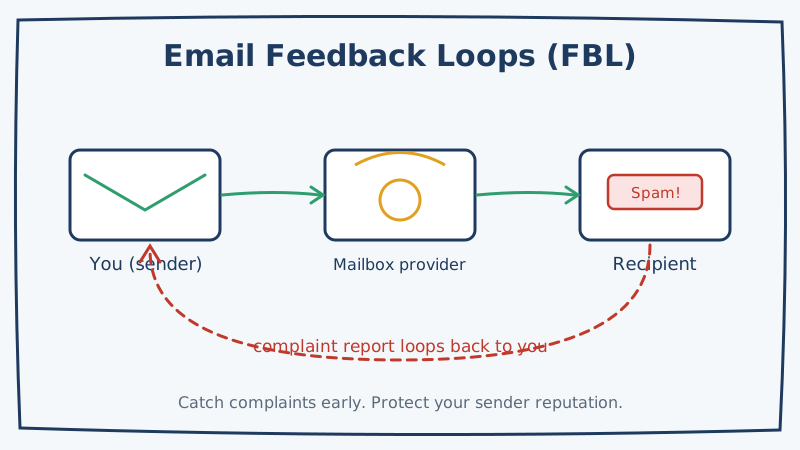
Every time a recipient clicks “Report spam” on one of your emails, a signal fires that quietly damages your sender reputation. The problem is that you usually never see it happen. The complaint goes to the recipient’s mailbox provider, the provider factors it into how it treats your future mail, and you keep sending to a contact who has already told the world they do not want to hear from you.
Feedback loops close that blind spot. An FBL is a reporting channel that a mailbox provider opens up so that when someone marks your message as spam, the provider forwards that complaint back to you. Used well, feedback loops let you spot problem contacts early, suppress them automatically, and stop a rising complaint rate before it drags you into the spam folder. This guide explains how FBLs work, which providers offer them, and exactly how to get one running.
What a Feedback Loop Actually Is
A feedback loop is an agreement between you (the sender) and a mailbox provider. You register your sending domains or IP addresses with the provider’s FBL program. In return, whenever one of that provider’s users marks your mail as spam, the provider sends you a copy of the complaint.
The report almost always arrives in a standard format called ARF (Abuse Reporting Format). An ARF message is a specially structured email that bundles three things: a human readable summary, machine readable metadata about the complaint, and a copy of the original message that was reported. Your systems parse that report, pull out the recipient address, and act on it.
The key point is timing. Without an FBL, you learn about unhappy recipients only indirectly, through rising bounce rates or falling engagement, long after the damage is done. With an FBL, you get told the moment someone complains, and you can remove that person from every future send.
Why Complaints Hurt So Much
Mailbox providers treat the spam button as one of the strongest negative signals a recipient can send. Gmail, through Google Postmaster Tools, reports your spam complaint rate as a headline metric, and the major providers now expect bulk senders to keep that rate under 0.3 percent, with 0.1 percent as the real target. Cross that line and your inbox placement falls off a cliff.
Complaints are worse than bounces in one important way. A bounce is a technical rejection: the address does not exist, or the server refused the message. A complaint is a human being actively telling the provider that your mail is unwanted. Providers weigh that human judgment heavily because it is exactly the outcome their spam filters exist to prevent.
That is why a feedback loop is not just a monitoring tool. It is a reputation defense system. Every complaint you catch and suppress is one you do not repeat, and the compounding effect of never re-mailing a complainer keeps your rate low over time.
Which Providers Offer Feedback Loops
Not every mailbox provider runs an FBL, and the ones that do handle them differently. Here is the current landscape.
Microsoft (Outlook, Hotmail, Live). Microsoft runs the Junk Mail Reporting Program (JMRP). You register your sending IPs, and Microsoft forwards complaints from its consumer mailboxes. This is one of the most valuable FBLs to enroll in because Microsoft’s consumer base is enormous and its filtering is aggressive.
Yahoo, AOL, and Verizon Media. These share a Complaint Feedback Loop program. Historically Yahoo tied its FBL to DKIM signing rather than IP, so your complaints are matched against the domain in your DKIM signature. That makes proper authentication a prerequisite, not an afterthought.
Google (Gmail). Google does not offer a traditional per-recipient FBL for most senders. Instead it provides an aggregate spam rate through Postmaster Tools, plus a separate schema based FBL aimed at large Email Service Providers who embed a special header. For most senders, Postmaster Tools is the practical substitute, so monitor it closely.
Other providers. Comcast, Cox, and a number of regional ISPs run their own loops. Many can be enrolled through the industry aggregator run by Validity (formerly Return Path). If you send meaningful volume, enrolling through an aggregator covers several smaller providers in one step.
How to Set Up a Feedback Loop
The mechanics vary by provider, but the workflow follows the same shape every time.
Step 1: Get Your Authentication in Order First
Before you enroll in any FBL, make sure your email authentication is complete and correct. You need valid SPF, a properly signed DKIM record, and a published DMARC policy. Several FBLs, Yahoo’s in particular, match complaints against your DKIM domain, so without signing you simply will not receive reports. Authentication is the foundation the whole system sits on.
Step 2: Choose a Dedicated Complaint Mailbox
Decide where ARF reports should land. Create a dedicated inbox such as fbl@yourdomain.com rather than pointing complaints at a shared team mailbox. Feedback reports arrive as machine readable messages, and you want a clean address that your automation can poll without a human wading through it.
Step 3: Register With Each Provider
Go to each provider’s FBL signup page and enroll your sending IPs or domains:
- Microsoft JMRP: register through the Smart Network Data Services (SNDS) portal.
- Yahoo and AOL: submit your DKIM signing domain through their Complaint Feedback Loop form.
- Aggregators: enroll once with Validity to cover multiple smaller ISPs.
Registration usually requires you to prove control of the IP or domain, so keep your DNS and reverse DNS records tidy before you start.
Step 4: Build the Processing Pipeline
This is where an FBL becomes useful rather than just noisy. Set up a process that:
- Polls the complaint mailbox for new ARF messages.
- Parses each report to extract the complained-about recipient address.
- Adds that address to a global suppression list immediately.
- Removes the contact from any active sequences or campaigns.
The suppression step is the whole point. A complaint you receive but do not act on is worse than useless, because you now have proof the recipient objected and you mailed them anyway.
Step 5: Monitor Trends, Not Just Individual Reports
Track your complaint volume over time and segment it by campaign, list source, and sending domain. A sudden spike almost always traces back to a single bad list or an overly aggressive campaign. Feedback loop data is some of the cleanest diagnostic information you will ever get about which of your acquisition sources are producing unhappy recipients.
Feedback Loops Are the Last Line, Not the First
Here is the uncomfortable truth about FBLs: by the time a complaint reaches you, the damage is already partly done. The recipient was annoyed enough to hit the spam button, and the provider already logged a negative signal. Feedback loops stop the second, third, and tenth complaint from that person, but they cannot undo the first.
That is why the real work happens before you ever hit send. The single biggest driver of complaints is mailing people who never meaningfully opted in, or whose addresses were scraped, guessed, or gone stale. Cleaning your list first removes the addresses most likely to generate complaints in the first place, including spam traps that exist specifically to catch senders with poor list hygiene.
This is where validation earns its place in the stack. Running a list through Scrubby before a campaign flags invalid, risky, and catch-all addresses that traditional verifiers wave through, and those risky addresses are disproportionately the ones that bounce or complain. For cold outreach specifically, pairing clean lists with a lower volume, higher relevance approach through a tool like Kali reduces the recipient annoyance that produces complaints in the first place. Feedback loops then catch whatever slips through, and the two layers together keep your complaint rate comfortably under the thresholds that decide inbox placement.
Putting It Together
Feedback loops turn an invisible reputation leak into a stream of actionable data. Set them up in this order and they will pay for themselves quickly:
- Complete SPF, DKIM, and DMARC so providers can match complaints to you.
- Create a dedicated FBL mailbox for ARF reports.
- Enroll with Microsoft, Yahoo/AOL, and an aggregator for smaller ISPs.
- Build automation that suppresses every complainer instantly.
- Watch Postmaster Tools for Gmail, since Google handles complaints differently.
- Validate every list before sending so complaints stay rare to begin with.
Do all six and you close the loop on one of the most damaging blind spots in email. You stop re-mailing people who have already objected, you protect the sender reputation you have worked to build, and you keep more of your legitimate mail landing where it belongs: the inbox.

Kristel K.
Content Strategist